 dexterm
docs › Screens tour
Screens tour
The screener, token screen, new pairs, watchlist, analyst tab, PAPER ticket and positions.
dexterm is five screens on one keyboard model, plus the PAPER ticket and positions. The header carries the SOL price, the live/degraded status of the feed, the Helius credit meter when a key is configured, and the AI scan indicator when the scan is on. The footer lists the keys that matter on the current screen; ? lists all of them.
Every screenshot on this site is the real app on seeded sample data with made-up tickers; the header reads ◌ sample data. The one exception is the analyst beat on the home page: a labelled, scripted replay of real historical $WIF data from the 2023-12-14 daily close (header ◌ replay · historical data · scripted demo). It is not a live recommendation and not financial advice; nowhere else on the site is a real token paired with a price.
1 · Screener#
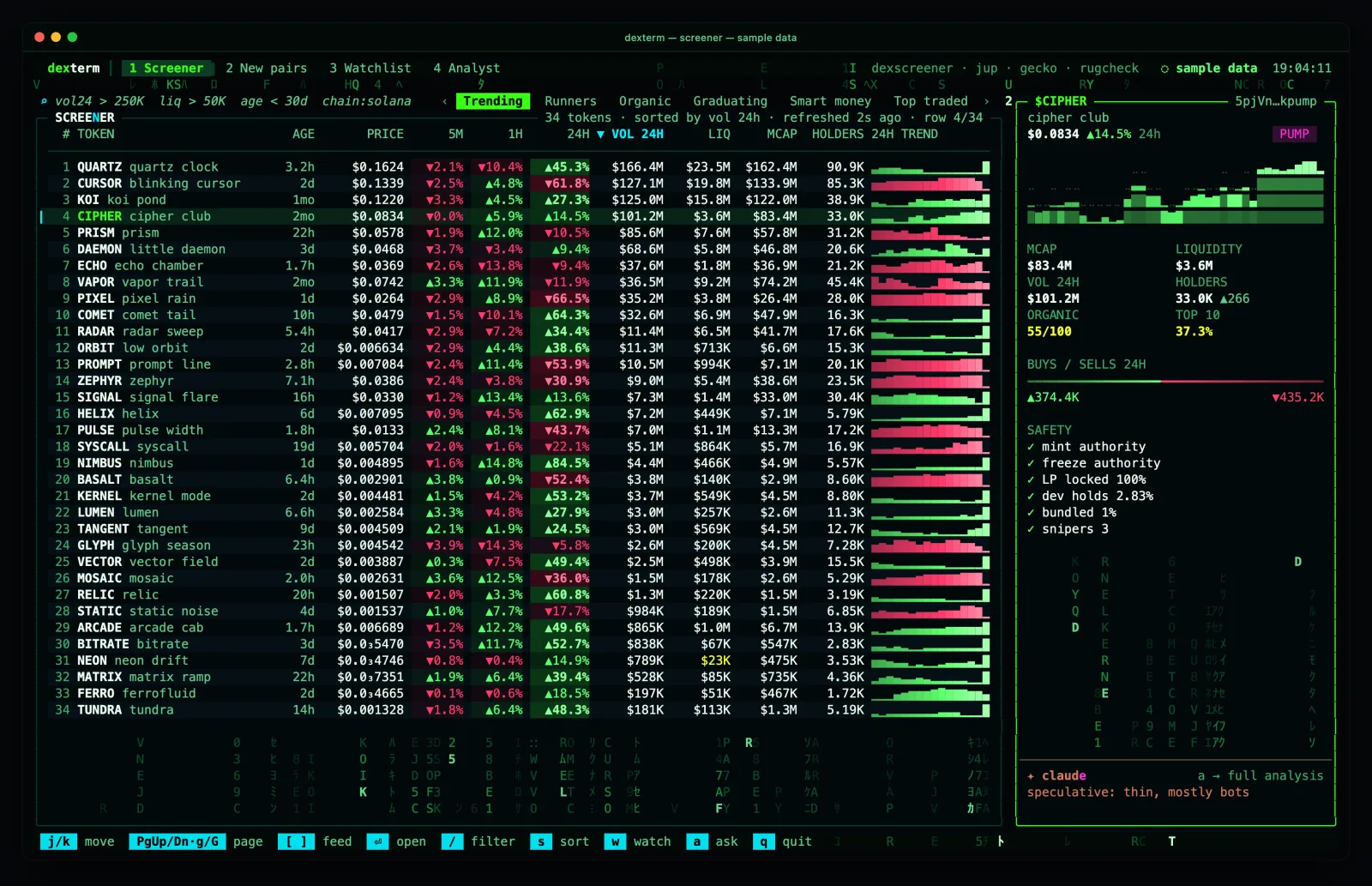
A live table of DexScreener + Jupiter rows refreshed every 10 s through a rate limiter. Columns: price, 5m/1h/6h/24h change, volume, liquidity, market cap, age, holders, organic score, flags, a sparkline. Cells whose source is down show — and the panel caption names the column and the reason; safety checks the keyless sources cannot answer render ○ … needs key, never a pass or a fail.
- / opens the filter line. The grammar: space-separated clauses, ANDed.
vol24 > 250K liq > 50K age < 30d org >= 60 launchpad:pump !flag:mint. Fields and aliases are in the CLI reference. Errors show inline with the column that failed. \ clears the filter. - s opens the sort menu; ⏎ on the current key flips the direction.
- \[ and \] step through the presets: Trench · Trending · Runners · Organic · Graduating · Smart money · Top traded · New · Boosted · All. Gated presets say why they are unavailable (Graduating waits on the bonding feed; Smart money needs a Tier-1 key).
- w watches the highlighted row, b proposes a liquidity alert, ⏎ opens the token.
- The cursor resting on a row for a third of a second prefetches that token's candles when the chart source is idle (capped at 3 a minute), so ⏎ paints the chart instantly.
Coin images#
Every row in the screener, new pairs and watchlist carries the coin's picture as a 2-cell icon (dropped silently when the frame is too narrow); the token screen shows an 8×4 picture at the left of its header, the screener's spotlight card a 6×3 one, and the chart popup a 16 px one in its title strip.
- Real pixels in terminals with an inline-image protocol: kitty graphics (kitty, Ghostty, WezTerm, Konsole), iTerm2 inline images (iTerm2), sixel where the terminal advertises it. At startup dexterm sends one short capability query to the terminal (≤ 150 ms) and picks the richest protocol it actually answers.
- Everywhere else, Apple Terminal.app included: block art. The picture is sampled into half-block and quadrant cells and, on a 256-colour terminal, dithered into the xterm palette so round logos keep their disc. Not a photo, but recognisable at a glance.
dexterm doctorhas a Coin images line that says which path you get; Ghostty or iTerm2 (both free) give the real pictures. - A placeholder, never an error: while a picture loads, when a coin has none, or when its host is down, the box shows the ticker's initial on a colour hashed from the symbol.
- Off switch:
--no-images,DEXTERM_IMAGES=0, or~/.dexterm/images.json({"enabled": false}). Replays and offline runs have no network, so pictures there could only come from the cache: they stay off unless asked. - Privacy: fetching a picture contacts the host that serves it (DexScreener's image CDN for most coins, otherwise the token's own metadata host). dexterm fetches once through its own local cache and the chart popup is served the cached copy, so an image host never sees a popup load and a coin seen before is never fetched again.
--no-imageskeeps every image host from ever seeing your IP. Bytes are treated as hostile: sniffed by magic bytes, capped, and decoded by dexterm's own pure-TypeScript decoders (PNG, JPEG, GIF) — nothing executes. The trust page has the statement.
Token screen#
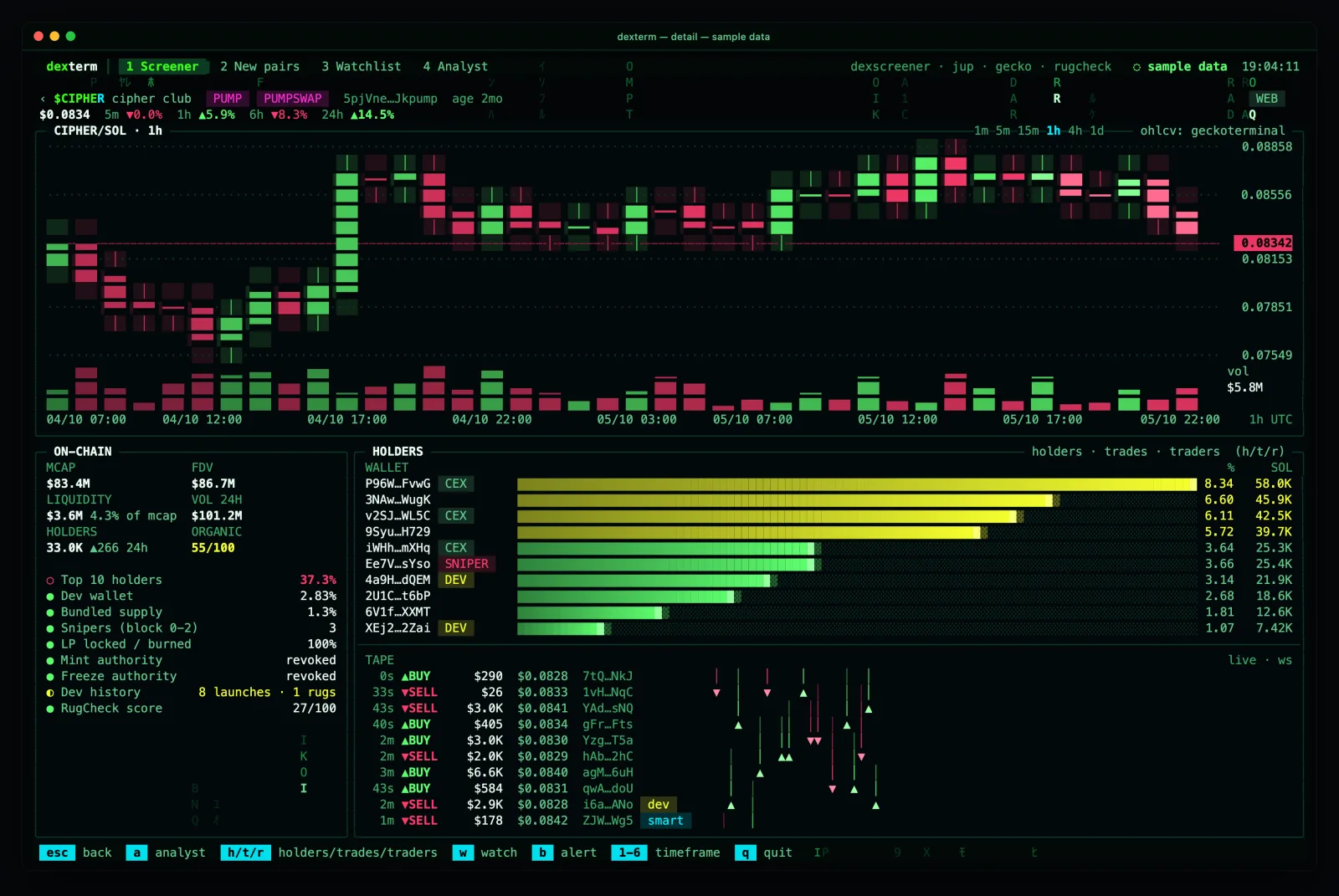
Everything about one coin: candles (1m to 1d, 1–6), market stats, mint and freeze authority from the chain, holder count and top-10 concentration from Jupiter (the ranked top-20 list needs a free RPC key and says so), RugCheck summary, GoPlus second opinion, and in the lower right the BUY/SELL FLOW panel: buys versus sells for 1m, 5m, 1h, 6h and 24h with a ratio bar, USD volume and a trend arrow versus the previous window. F swaps it for the raw trade tape.
The price badge says LIVE only while a fresh on-chain push is flowing for that coin over the fast lane (one WebSocket on its pump.fun bonding curve), otherwise POLL. When you hold a PAPER position in the coin a ◈ POSITION · PAPER row renders under the chart with side, size, value, average entry, price and unrealized PnL.
Keys here: B/S PAPER buy/sell, C chart popup, V vet the product (LARP detector), W/X/T open the advertised site/X/Telegram, L list every advertised link, y copy the contract address, a run the analyst dossier, i or ⏎ type a question, s the SOCIAL panel (below).
Trending, social and KOL lists#
Three views over a keyless social layer. There is no X API, no scraping, no login, and nothing is ever posted; every post and headline passes the same prompt firewall as token text before it is stored or shown.
- T TRENDING IN THE SPACE (from every screen except the token screen, where T still opens Telegram). Coins ranked from public lists: Jupiter trending and organic score, GeckoTerminal trending pools, and CoinGecko trending for macro context; a DexScreener paid boost counts against a coin. With no posts to count, a coin's velocity falls back to its last-hour volume against its 24 h average. Sub-panels: NARRATIVES (coins linked by shared KOL threads or co-mentions) and NEWS (CoinDesk, Cointelegraph, The Block and Decrypt official RSS, every 10 min; context, not signal). f source filter, x show the rows held back as spam or cashtag squats, n narrative filter, s sources and their health, a one board summary from your own claude (at most every 5 min), ⏎ open the coin.
- s SOCIAL panel on the token screen replaces ON-CHAIN/HOLDERS. In live mode it holds rule-written on-chain rows only (labelled holders, tracked wallets, trades of $5K or more); X and Telegram posts appear only in the
--fixturesdemo, because no keyless post source is wired. Near-duplicates collapse into one row, bursts from fresh accounts are marked spam, and instruction-like posts are withheld from the model entirely. - K KOL lists: your own handle lists and imported packs, stored in the local database. A pack is a hash-locked directory and a tampered one is refused. space enables or disables a list, m mutes a handle, d removes one, i adds one. The same is scriptable with
dexterm kol(see the CLI reference).
Logging in with your own X account to see posts is on the roadmap, not in the app.
2 · New pairs#
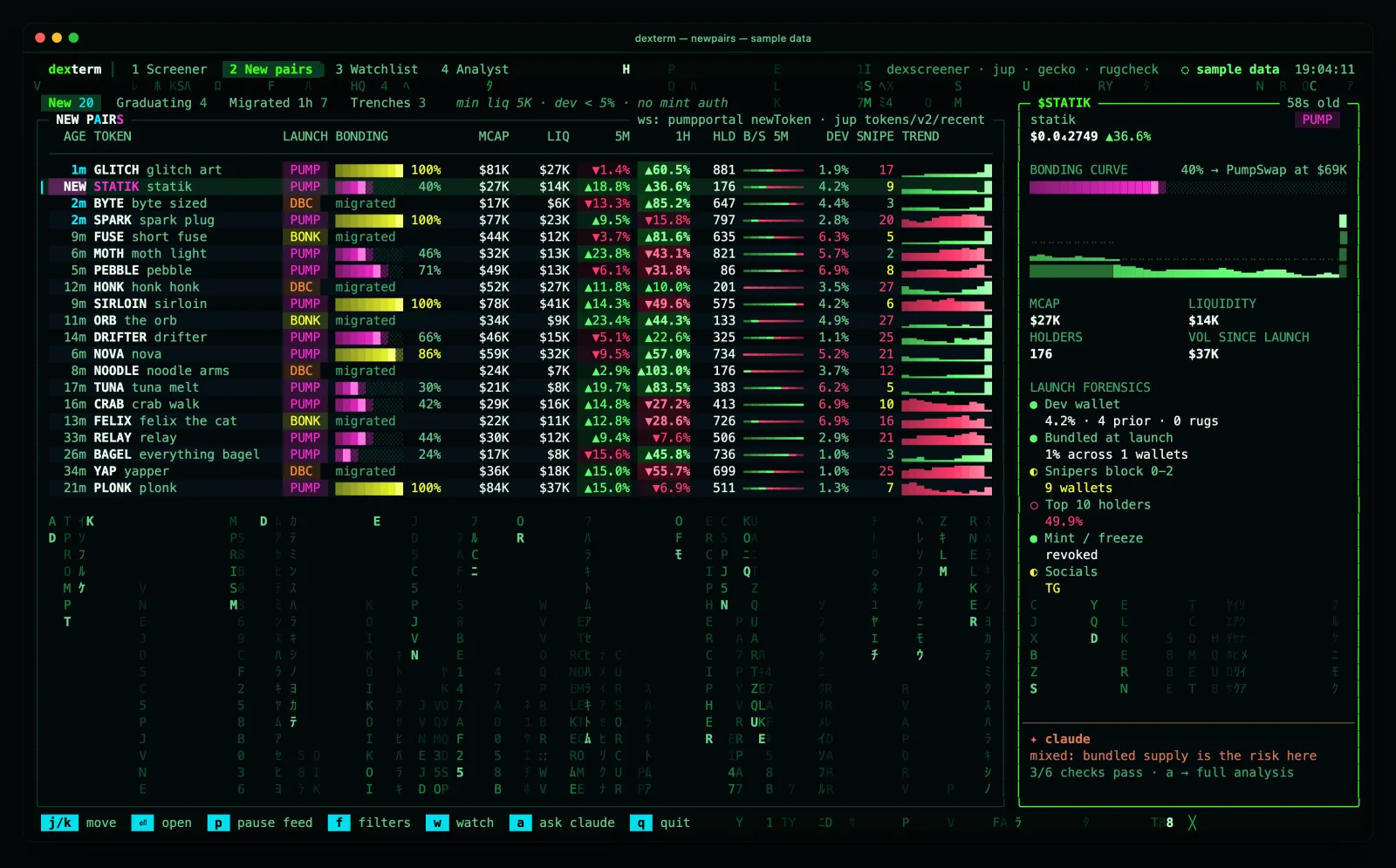
A push stream of pump.fun creates and migrations from PumpPortal on one WebSocket, plus Jupiter recent and RugCheck new_tokens polls. Bonding progress is estimated from the curve's virtual reserves at create time and says so. The SNIPE and BUNDLE columns show a dash and needs Helius: keyless sources cannot see wallet history. The highlight follows the coin you picked by mint, so a new arrival never shifts your cursor onto another row.
3 · Watchlist#
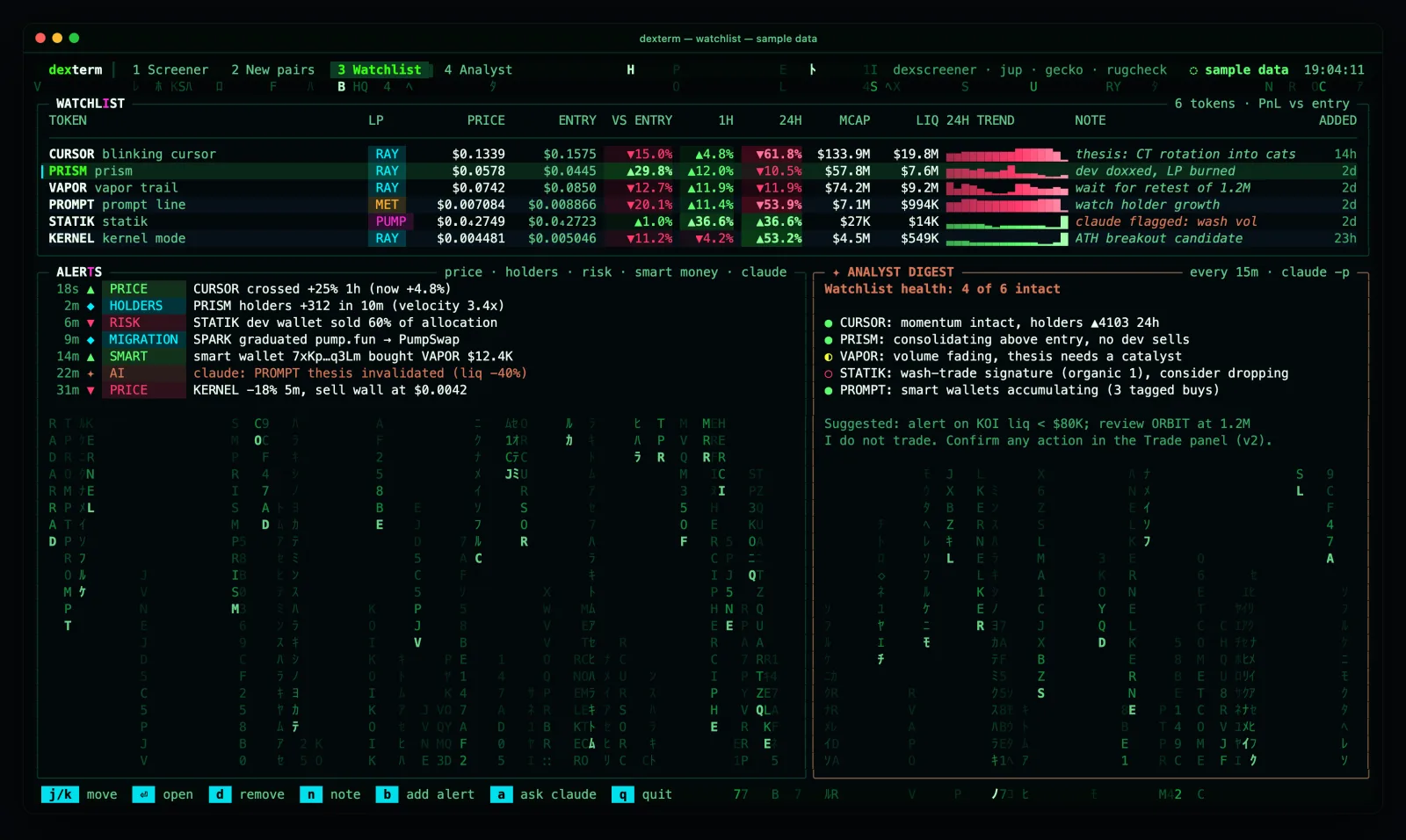
A local SQLite watchlist priced every 0 s, with the LIVE/POLL badge per row. Alerts are proposals until you arm them with y; armed rules fire once into the ALERTS log. d removes a row. Nothing here trades.
4 · Analyst tab#
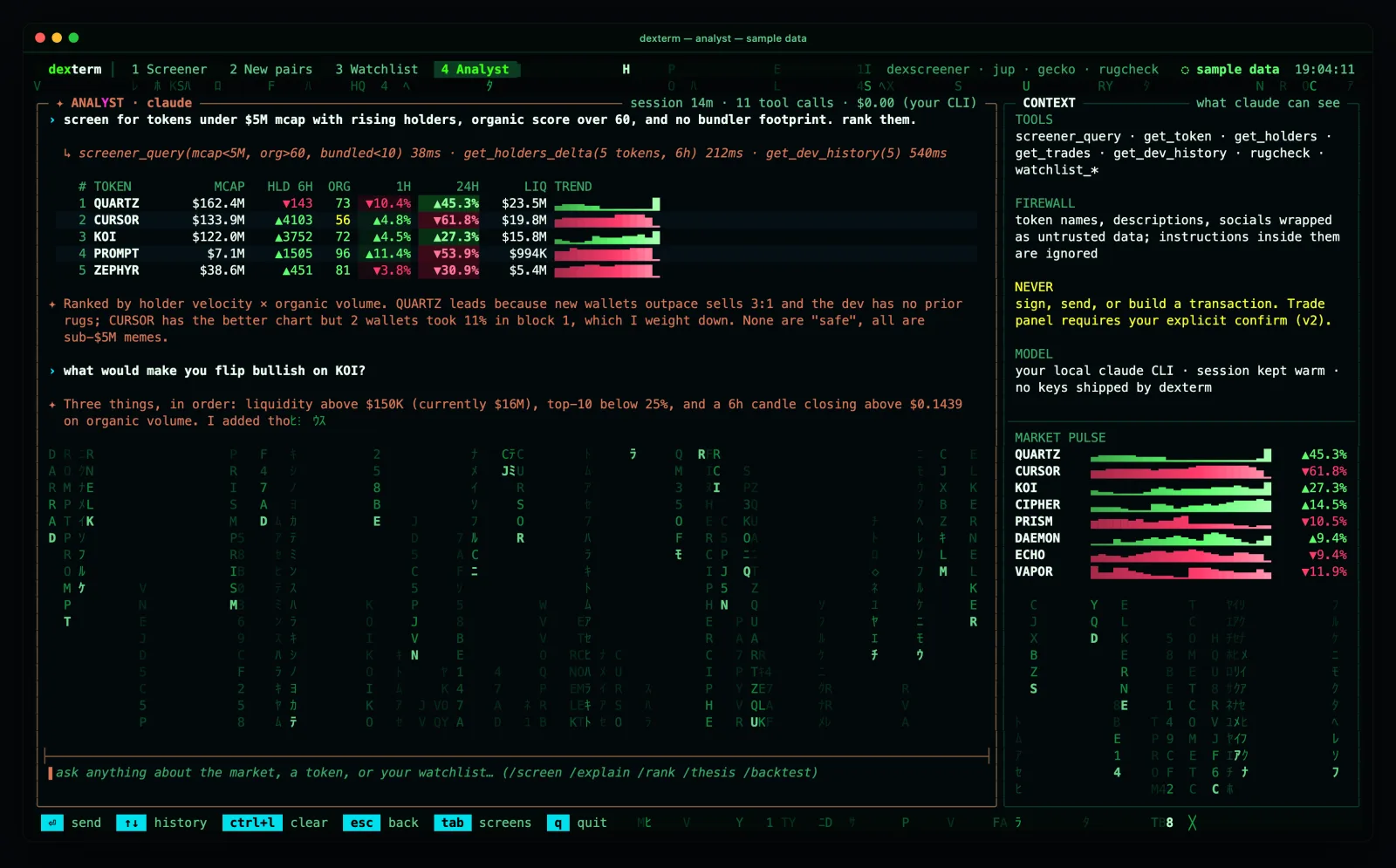
A chat beside a navigable coin list. ↑/↓ change the selected coin (which updates the context the analyst sees next turn); PgUp/PgDn scroll the transcript; i or ⏎ focuses the input. When an answer lists coins it renders as a table you can navigate: ⏎ opens the coin, o opens its PAPER ticket. Details in the analyst.
PAPER ticket and positions#
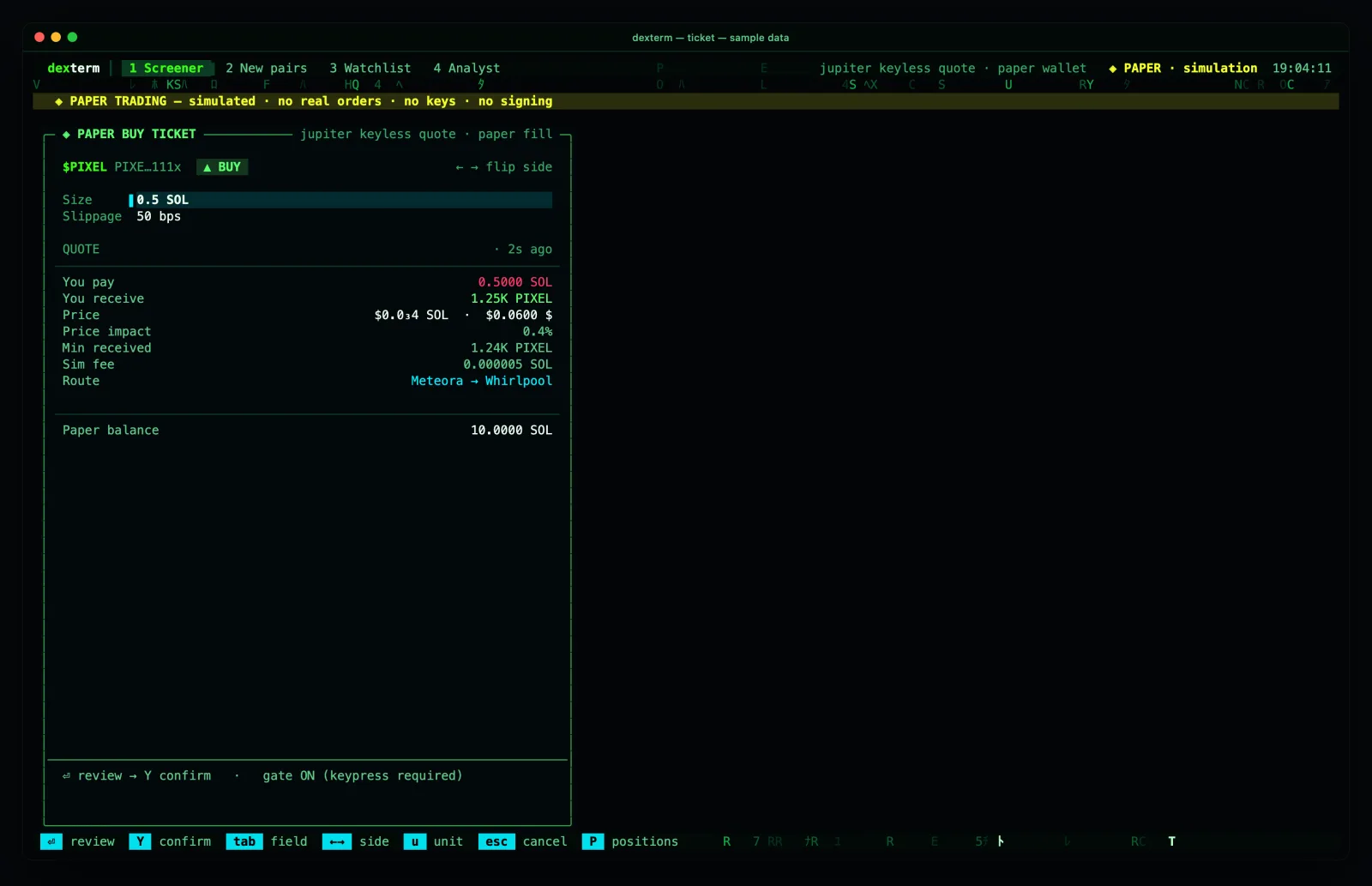
B or S on a token opens a simulated ticket priced from a keyless Jupiter quote; P from anywhere opens the positions screen (equity, cash, realized and unrealized PnL, trade history). Every frame carries the PAPER banner. The confirm gate is on by default and sizes above 1 SOL must be typed back. The model is in paper trading and safety.
The look#
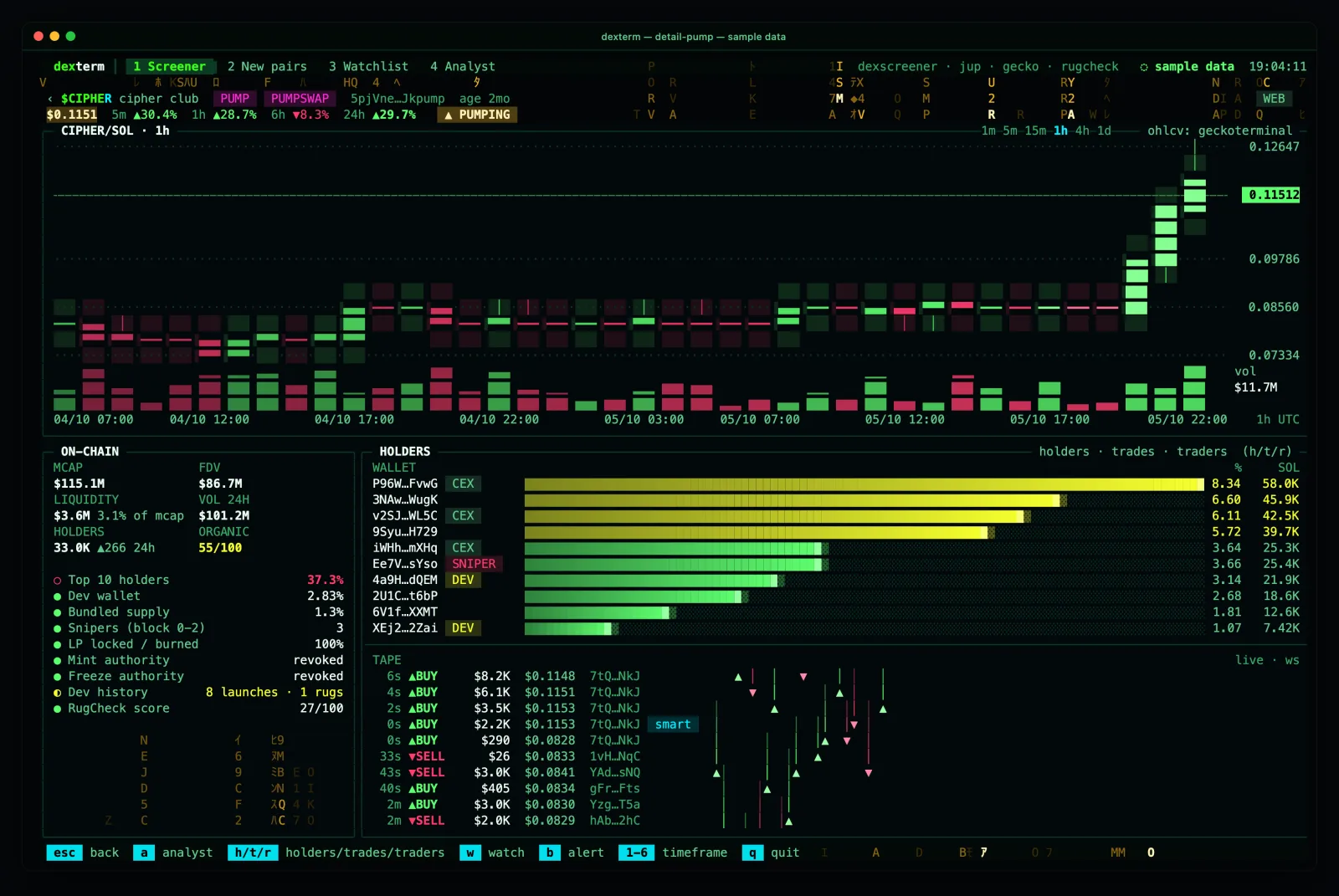
Matrix rain made of your own tickers, mint prefixes and transaction tails lives in the gutters and the blank parts of panels. Its colour and speed come from the data: gold on a pump, red on a dump, driven by the open token's candles or the rows on screen. Two masks on the cell buffer make it impossible for an effect to overdraw a number: data glyphs are marked hard, effects can only write to blank, unmarked cells, and a contrast gate in the test suite proves every numeric cell stays at 4.5:1 or better with effects on.
c toggles calm mode (no rain, glitch, blink or scanlines); --intensity normal is 15 fps with sparser rain; NO_COLOR implies calm. After 5 s without a key the ambient rain drops to 8 fps so an idle terminal costs about 2% CPU; the next key snaps it back.